
Know when it
really arrives.
Paloma tracks what you're waiting for in one list, then predicts the delivery date from how the scans are actually trending, not from the carrier's promise.


 +
Sun 5:12 PM
Signature1Z999AA10123456784 ↗
Fri 4:12 AM5:12 PM
LouisvilleBrooklyn
2d 13h
Track
Every carrier, one list.
Add a tracking number, scan it off the label, or forward the shipping email. Paloma sorts it all into arriving next, still moving and already delivered.
- UPS, FedEx, USPS, DHL and carriers around the world, tracked from the carriers' own scans.
- Amazon and everything else comes in when you forward the shipping email.PRO
- Destinations as cities, not postal codes, so you can tell parcels apart at a glance.
Predict
A date you can plan around.
Carriers quote the schedule. Paloma watches the scans, and when a parcel falls behind, its date moves before the carrier's does.
- Paloma predicted dates from how the scans are trending on the way.PRO
- A short explainer on every fact, so you can see why the date is what it is.
- Delivery weather for the day it's due.PRO
Running behind. The last three scans each came later than the carrier's schedule.
iPhone Duo
Unfold it. Paloma fills both halves.
Paloma knows where the fold is. Closed, half open or flat, each half gets its own job, and nothing important lands in the crease.
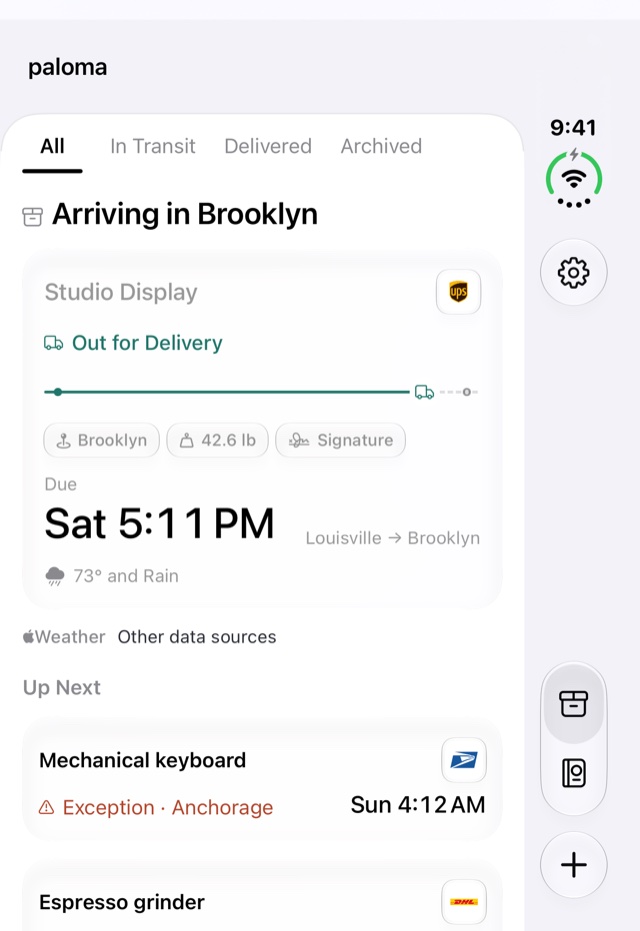
Closed. The whole list fits the outer display, with Packages, Passport and Track in a rail beside it.
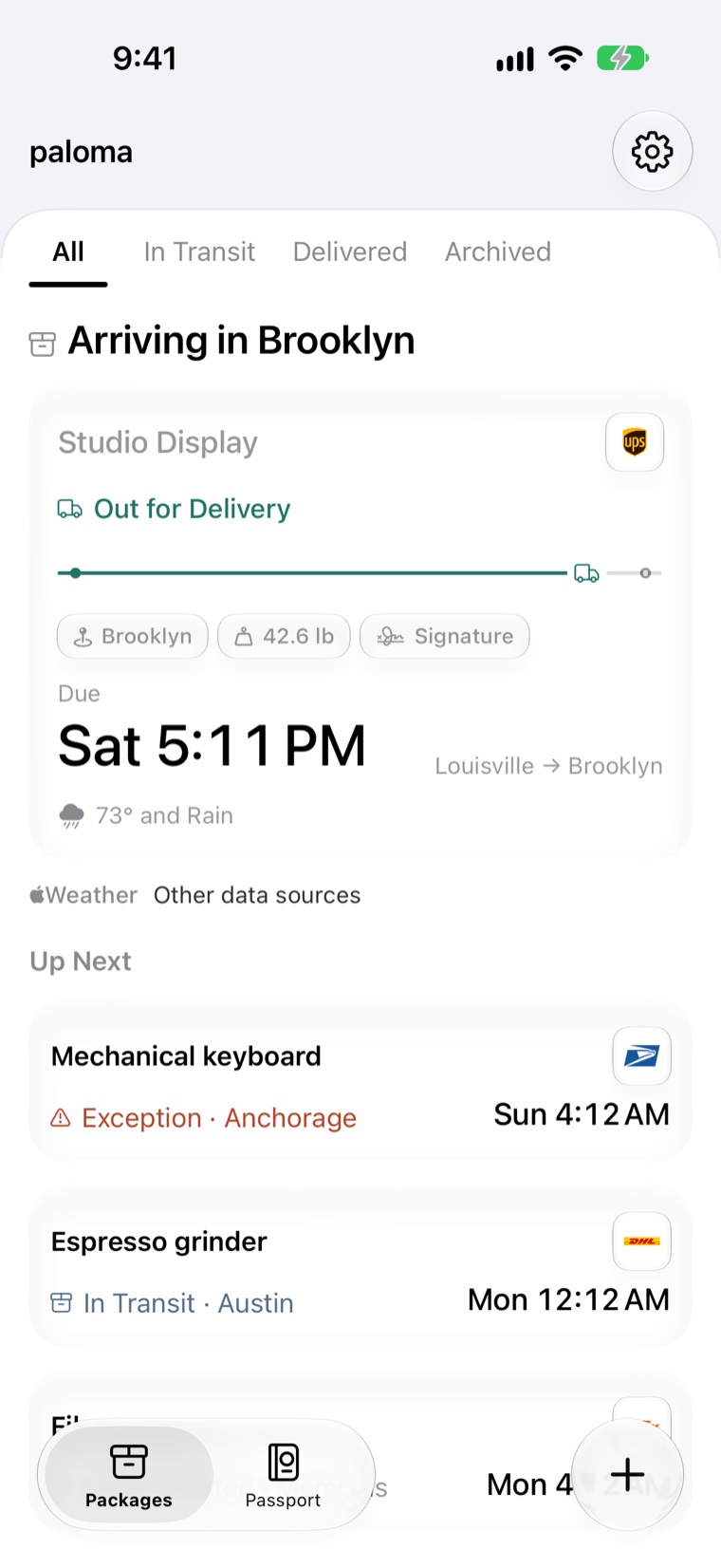
Arriving in Brooklyn
Studio Display
Out for Delivery
Brooklyn42.6 lbSignature
DueSun 5:12 PMLouisville → Brooklyn
73° and Rain
Up Next
Mechanical keyboard
Exception · AnchorageMon 4:12 AM
Espresso grinder
In Transit · AustinTue 12:12 AM
Sun 5:12 PM
Signature1Z999AA10123456784 ↗
Fri 4:12 AM5:12 PM
LouisvilleBrooklyn
2d 13h
Book. The list stays on one side of the fold, and the parcel you pick opens on the other.
Sun 5:12 PM
Signature1Z999AA10123456784 ↗
Fri 4:12 AM5:12 PM
LouisvilleBrooklyn
2d 13h
Laptop. Stand it on a table: the journey map sits above the fold, the details below it, where your thumb is.
Passport
PASSPORT · ALL TIME
Packages24
Distance18,640 miAs the crow flies
Time in transit61d 4h
Cities19
Countries4
All packages ›
Carriers
UPS9
Amazon7
USPS5
Journeys
Longest journey35mm lensPortland → Brooklyn · 2,450 mi
Fastest deliveryHiking bootsNewark → Brooklyn · 2d 6h
Open flat. Passport spreads across both halves: every package, mile and city, and the journeys worth remembering.
Nothing in the crease
Columns, cards and buttons end at the fold and start again past it, in every posture.
Its own outer layout
The outer display gets a list with a rail beside it, not a stretched phone screen.
One app, every shape
The same Paloma on the outer display, the inner one, iPhone and iPad.
Follow
Watch it turn onto your street.
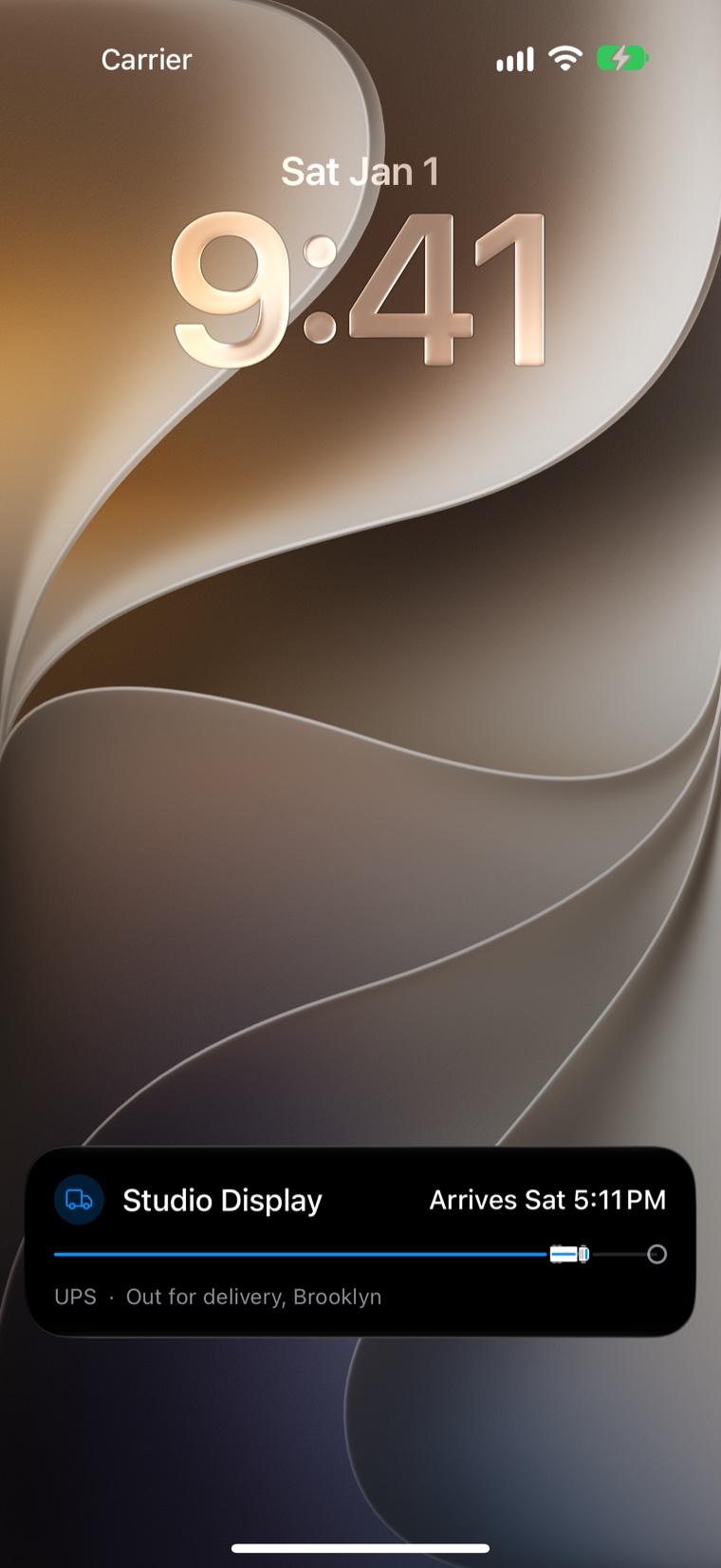
When a parcel goes out for delivery, a little truck drives along its road on your Lock Screen and in the Dynamic Island, so you don't have to open anything.
- Live Activities and the Dynamic Island while a parcel is out for delivery.PRO
- Out-for-delivery and delivered alerts, free. An alert on every status change with Pro.
- Widgets with what's arriving next on your Home Screen.
Passport
Your year in parcels.
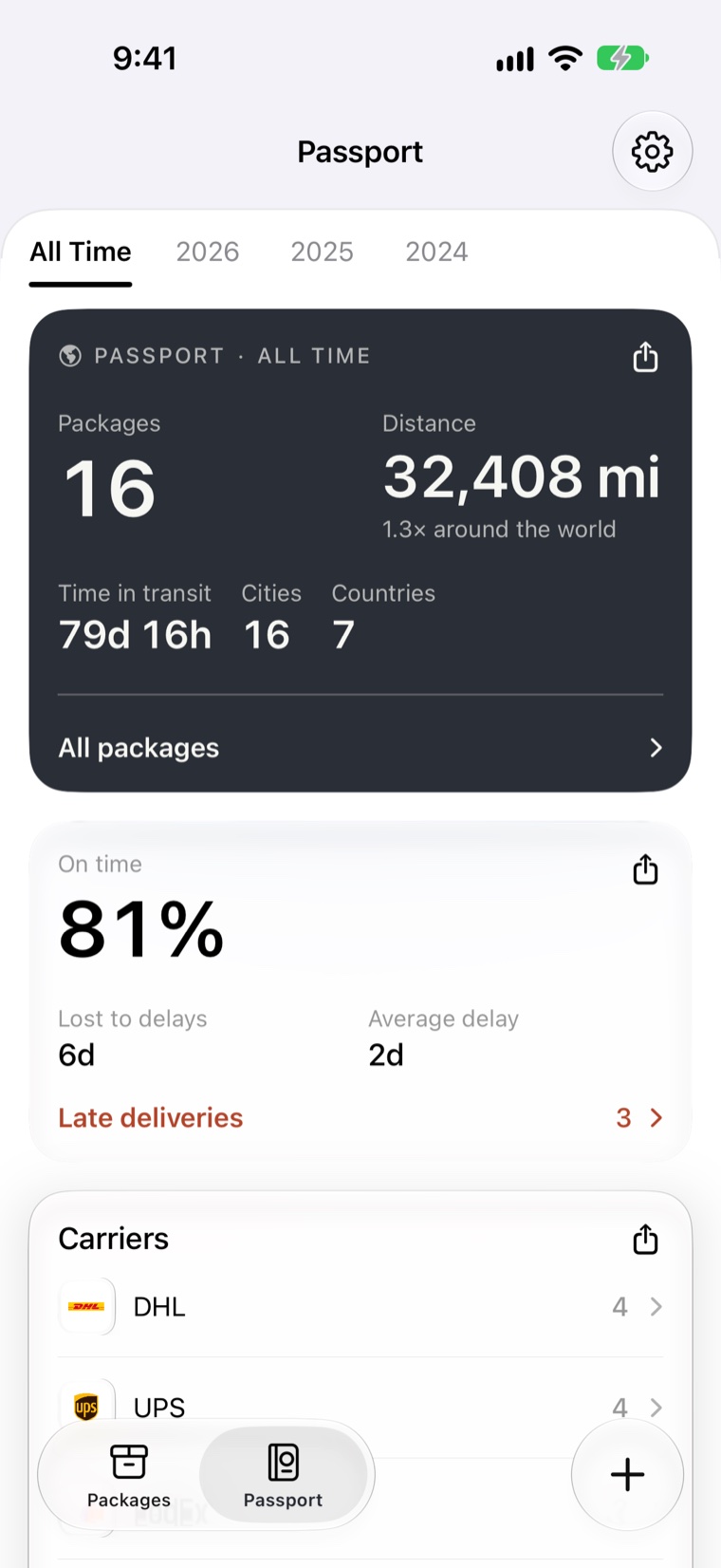
Every package you've tracked adds up: how far they came, how long they took, and which carriers kept their word.
- Miles traveled, cities and countries, all time or by year.
- The longest journey and the fastest delivery, and the carriers you use most.
- An on-time score for the promises carriers made you.
Privacy
Paloma reads mail for tracking numbers. That's all.
Forward a shipping email, share one, or connect Gmail with read-only access if you'd like Paloma to find them itself. Paloma keeps the tracking number, the item or retailer and the dates, and the message body is never stored.
Camera frames used to read a label never leave your phone, and you can delete your account and everything on it from Settings.
Paloma can
Read new messages to find tracking numbers
Keep the number, the retailer and the dates
Paloma can't
Store your messages or a copy of your inbox
Send, delete or change any mail
Disconnect GmailThe details.
Your forwarding address
Send shipping emails to your own Paloma address, or set your inbox to forward them for you.
Scan a label
Point the camera at a shipping label and Paloma reads the tracking number on your phone.
Share sheet
Share a tracking number or a shipping email from any app straight into Paloma.
Journey map
Where it started, where it is and where it's headed, with how far it has come.
Delivery weather
The forecast for the day a parcel is due, so you know if it'll sit in the rain.
Alerts that matter
Out for delivery and delivered, free. Every scan that changes the status, with Pro.
Shortcuts, Siri and Spotlight
Ask what's arriving today, track a number, or find a parcel from search.
Archive
Delivered parcels move out of the way and stay findable in Archived.
Your data, yours
Delete your account in Settings and everything on it goes with it, Gmail access included.
Made for every iPhone, and iPad.
Built with SwiftUI for iOS 26 and Liquid Glass, and at home on whatever screen you're holding.
iPhone Duo
Both displays, and every posture in between.
iPhone
Everything you're waiting for, one-handed.
iPad
The list and the parcel side by side.
Live Activities
The truck on its road, on the Lock Screen.
Dynamic Island
The arrival time, always in view.
Widgets
What's arriving next, on your Home Screen.
Shortcuts and Siri
Track a number or check today's deliveries by voice.
Sign in with Apple
No password, and your email can stay hidden.
Simple plans.
Start free. Pro is billed through the App Store, and you can cancel any time in your Apple account settings.
Free
$0
- 2 active parcels
- Every carrier Paloma tracks
- Out-for-delivery and delivered alerts
Pro For everything you order
$5.99/month
- Unlimited parcels
- Auto-forward shipping mail, including Amazon
- Paloma predicted dates and delivery weather
- Lock Screen and Dynamic Island
- Journey map and progress explainers
- An alert on every status change
- Faster background refresh
Questions
What does Paloma cost?
Which carriers does it track?
How does Paloma predict a delivery date?
Does Paloma read my email?
Does it work on iPhone Duo?
Can I delete my data?
When can I get it?
Order it Monday. Forward the email. Unfold your phone on Saturday morning and watch the truck turn onto your street, right when Paloma said it would.